---
title: How to track your doola support tickets in the Help Center
description: doola Customer Portal
---
[Skip to content](https://help.doola.com/doola-customer-portal#main-content)
[More support](https://help.doola.com/kb-tickets/new?hsLang=en)

- [Co-founder AI](https://app.doola.com/ai-cofounder)
- [doola blog](https://www.doola.com/blog/)
- Contact Us
Show submenu for Contact Us
- [Support Team](https://share.hsforms.com/2N-Eu7D6cR4uFMRWloX-gQwdsvv8)
- [Sales Team](https://www.doola.com/demo/?wpforms-44587-field_34=demo)
- [Track Support Tickets](https://help.doola.com/help-center)
Open main navigation
Close main navigation
- [Co-founder AI](https://app.doola.com/ai-cofounder)
- [doola blog](https://www.doola.com/blog/)
- Contact Us
Show submenu for Contact Us
- [Support Team](https://share.hsforms.com/2N-Eu7D6cR4uFMRWloX-gQwdsvv8)
- [Sales Team](https://www.doola.com/demo/?wpforms-44587-field_34=demo)
- [Track Support Tickets](https://help.doola.com/help-center)
- [More support](https://help.doola.com/kb-tickets/new)
- [Contact us](https://help.doola.com/how-to-contact-doola-support-doola-help-center)
[Contact us](https://help.doola.com/how-to-contact-doola-support-doola-help-center?hsLang=en)
How can we help you?
- There are no suggestions because the search field is empty.
1. [doola Help Center](https://help.doola.com/?hsLang=en)
2. [About doola](https://help.doola.com/about-doola?hsLang=en)
# How to track your doola support tickets in the Help Center
## Manage support requests, track progress, and stay connected with our team — all in one place.
### **Summary**
- [**Create & manage tickets**](https://help.doola.com/_hcms/mem/login?redirect_url=https%3A%2F%2Fhelp.doola.com%2Fhelp-center&hsLang=en) in a single dashboard.
- **Reply by email or in the portal** — everything stays synced.
- **You must sign up** with the **same email** you use with doola to see your full history.
- You cannot use your existing doola dashboard credentials to login. You must sign up for this portal separately.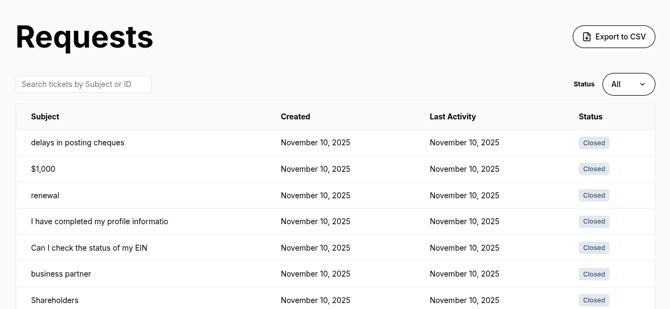
### **What you can do**
- 📝 **Submit new tickets** anytime.
- 📂 **Track and reply** open tickets in one place.
- 📜 **View your full ticket history**, including older requests.
- 📧 **Use email if you prefer** — replies sent by email sync back to the portal automatically.
### **Sign up & log in**
1. Open the **[help center link](https://help.doola.com/help-center?hsLang=en)**.
2. **Sign up with the same email** you use with doola (this pulls in your past tickets).
3. **Verify your email** and log in.
> Tip: You can also log in by entering your email to receive a **magic link or code**.
### **Submit or reply to a ticket**
**Submit a new ticket:**
- Click **Submit a ticket** → choose a **category** → add a **clear subject** → include details (what happened, steps tried, screenshots) → **attach files** if useful → **submit**.
**Continue a thread:**
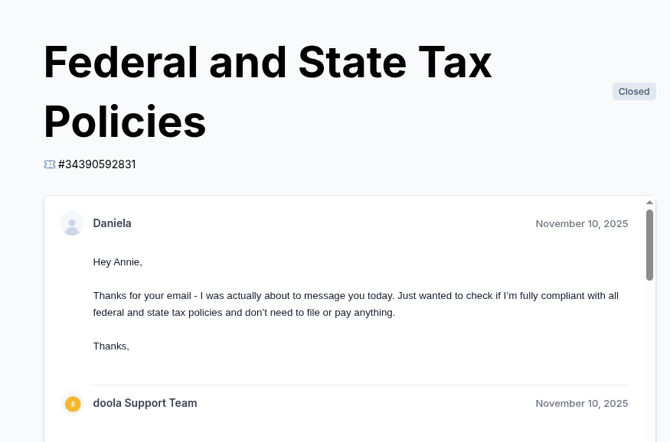
- Open your ticket in the portal, type your reply, and **add attachments** if needed. You’ll see updates in real time.
- Or just **reply to the email** you received - it will sync back to the same ticket.
---
### **How to track your support ticket:**
1. Open the doola Help Center and log into the Support Portal
2. Go to **My tickets** (or **Requests**)
3. Click the ticket you want to track
4. You’ll see:
- - Ticket **status** (Open /Closed)
- Full **message history**
- Latest **support replies**
- Any **attachments** shared in the thread
---
#### **Quick answers (FAQ)**
- **“I can’t see my old tickets.”** Make sure you signed up with the **same email** you use with doola. If you used multiple emails, ask us to merge your records.
- **“I didn’t get the confirmation/invite email.”** Check spam/junk for “Support.” We can resend the invite and help safelist our sender domain.
- **“Can I just reply by email?”** Yes. Keep replies in the **same thread** (don’t change the subject) and they’ll sync to the portal.
- **“Do I need a new password?”** You can reuse your current one or create a **portal-only** password. Forgot it? Use **Forgot password**.
**Need help now?** Email **hello@doola.com** or submit a ticket in the portal.
- [About doola](https://help.doola.com/about-doola?hsLang=en)
- [Plans and Services](https://help.doola.com/plans-and-services?hsLang=en)
- [Start a Company](https://help.doola.com/start-a-company?hsLang=en#main-content)
- [S-Corporation](https://help.doola.com/start-a-company?hsLang=en#s-corporation)
- [General](https://help.doola.com/start-a-company?hsLang=en#general)
- [Overseas Direct Investment (ODI) Compliance (India only)](https://help.doola.com/start-a-company?hsLang=en#overseas-direct-investment-odi-compliance-india-only)
- [Compliance](https://help.doola.com/start-a-company?hsLang=en#compliance)
- [LLC and C-Corporations](https://help.doola.com/start-a-company?hsLang=en#llc-and-c-corporations)
- [EIN & ITIN](https://help.doola.com/ein-itin?hsLang=en)
- [Required Filings & Deadlines](https://help.doola.com/required-filings-deadlines?hsLang=en#main-content)
- [Federal (IRS) Tax](https://help.doola.com/required-filings-deadlines?hsLang=en#federal-irs-tax)
- [Sales Tax](https://help.doola.com/required-filings-deadlines?hsLang=en#sales-tax)
- [Taxes & Ongoing Compliance](https://help.doola.com/taxes-ongoing-compliance?hsLang=en#main-content)
- [Tax Preparation](https://help.doola.com/taxes-ongoing-compliance?hsLang=en#tax-preparation)
- [IRS Payments](https://help.doola.com/taxes-ongoing-compliance?hsLang=en#irs-payments)
- [General Questions](https://help.doola.com/general-questions?hsLang=en)
- [doola Analytics (Reports & Insights)](https://help.doola.com/doola-analytics-reports-insights?hsLang=en)
- [doola Books and Dedicated Bookkeeping](https://help.doola.com/doola-books-and-dedicated-bookkeeping?hsLang=en#main-content)
- [doola Bookkeeping](https://help.doola.com/doola-books-and-dedicated-bookkeeping?hsLang=en#doola-bookkeeping)
- [doola Invoicing](https://help.doola.com/doola-books-and-dedicated-bookkeeping?hsLang=en#doola-invoicing)
- [doola Books Navigation](https://help.doola.com/doola-books-and-dedicated-bookkeeping?hsLang=en#doola-books-navigation)
- [Referrals & Rewards Program](https://help.doola.com/referrals-rewards-program?hsLang=en)
- [Amazon US](https://help.doola.com/amazon-us?hsLang=en)
- [Payments](https://help.doola.com/payments?hsLang=en)
- [Mailing Services](https://help.doola.com/mailing-services?hsLang=en)
[](http://doola.com)
[mailto:email@email.com](mailto:email@email.com)
Copyright © 2026, doola